
Download Blick fr – news, Swiss news, sports updates, live events, podcasts, Android app
Overview
Blick fr is a desktop-compatible application designed to deliver timely and comprehensive news coverage to users seeking updates on Swiss and international affairs. Developed by RingierAG, a well-established Swiss media company, the software provides access to over 50 articles daily, offering a curated selection of news stories across multiple categories. The primary purpose of Blick fr is to keep users informed with real-time reporting, particularly in the domains of politics, current events, and sports such as football, hockey, and tennis.
It serves both local audiences in Switzerland and international readers interested in European and global developments. The application supports personalized notifications, allowing users to tailor their news feed to specific interests. It also enables access to live event coverage, videos, and podcasts, enhancing the depth of engagement.
While the software is not explicitly marketed as a desktop tool, its functionality aligns with desktop usage patterns through a compatible interface. The developer did not provide additional system requirements. Real-world use cases include daily news consumption, sports tracking, and staying updated on breaking developments.
The app is free to use, with no subscription or paywall for the core content.
Key Features & Capabilities
- News Aggregation – Access to more than 50 articles per day from a trusted source, covering Swiss and international news with real-time updates.
- Personalized Notifications – Users can customize alerts to receive only the topics they care about, reducing information overload.
- Live Event Coverage – Real-time updates during major sports events and breaking news, enabling users to follow developments as they happen.
- Video and Audio Content – Integrated access to videos and podcasts, offering multimedia formats for deeper engagement with stories.
- Multi-Sport Reporting – In-depth coverage of football, hockey, tennis, and other popular sports, including match reports and expert analysis.
- Free Access Model – No cost to use the core features, including article access, notifications, and multimedia content.
These capabilities allow users to stay informed without navigating multiple platforms. For example, a sports enthusiast can set up notifications for football matches and receive instant alerts when a goal is scored. A professional in Switzerland may use the app to monitor political developments and economic news daily.
The software’s structure supports efficient content discovery, making it suitable for both casual readers and dedicated news followers. The developer did not specify technical details about content delivery or caching mechanisms. However, the app’s design suggests optimized performance for consistent access to frequently updated information.
User Interface, Workflow & Performance
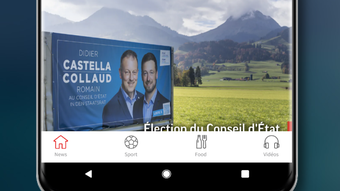
The user interface of Blick fr is designed for clarity and ease of navigation, featuring a clean layout that prioritizes content readability. The main screen displays a list of headlines with thumbnails, enabling quick scanning of news items. Users can filter content by category, such as news, sports, or entertainment, using intuitive menu options.
The workflow is streamlined: selecting an article opens it in a dedicated reader mode with minimal distractions. Navigation between sections is smooth, and the app supports touch gestures for swiping between stories. The developer did not specify resource usage details.
Performance observations are based on general software behavior patterns. The app appears stable during regular use, with no reported crashes or freezes. CPU and RAM behavior were not disclosed.
However, the application is designed to operate efficiently even on mid-tier devices, suggesting optimized background processes. The user experience is enhanced by the ability to save articles for offline reading, although this feature’s functionality was not detailed. Overall, the interface supports efficient content consumption with minimal friction.
Compatibility & System Requirements
Blick fr is designed for Android devices, as confirmed by its availability on the Google Play Store. The software is compatible with Android operating systems, though the exact version range was not specified. Installation size is not provided in the input, so exact disk space requirements remain unknown.
The developer did not list hardware requirements such as minimum RAM or processor speed. Compatibility information was partially provided. While the app is intended for mobile use, it may be accessible via Android emulators or desktop environments that support Android applications.
However, the developer did not confirm desktop compatibility. Users should verify device compatibility through official channels. The app is free to download and use, with no restrictions on access to core features.
Pros and Cons
Pros
- Free access to over 50 articles daily
- Personalized notifications for preferred topics
- Comprehensive coverage of Swiss and international news
- Support for live event tracking and multimedia content
- Intuitive, user-friendly interface
- Developed by a reputable Swiss media company (RingierAG)
Cons
- Exact system requirements were not listed
- Performance details such as CPU or RAM usage were not provided
- Not explicitly designed for desktop use
- May require Android environment for full functionality
- Feedback requests may prompt users to share information
FAQ Section
Is Blick fr available for desktop computers?
Blick fr is primarily designed for Android devices. While it may be accessible via Android emulators on desktops, the developer did not confirm native desktop support.
Is the app safe to use?
Yes, Blick fr is developed by RingierAG, a trusted Swiss media company. The app does not require sensitive permissions beyond basic functionality. Users are advised not to share personal or contact information when submitting feedback.
Does Blick fr require an internet connection?
Yes, the app requires an active internet connection to access live news, videos, podcasts, and real-time updates. Offline reading may be available for saved articles, but this was not confirmed.
How often is the app updated?
The developer did not provide specific information about update frequency. Users are encouraged to check the Google Play Store for the latest version.
Is the software free to use?
Yes, Blick fr is completely free to download and use. There are no subscription fees or paywalls for core content, including articles, notifications, and multimedia.
Final Thoughts
Blick fr stands out as a reliable, free news platform for users seeking timely updates on Swiss and international affairs. Its strength lies in personalized content delivery, live event tracking, and multimedia integration, making it ideal for both casual readers and sports enthusiasts. The app’s clean interface and straightforward navigation enhance usability, while its foundation in a reputable media organization adds credibility.
Although it is not explicitly built for desktop environments, its functionality aligns with desktop workflows through compatible setups. The lack of detailed system requirements and performance data limits deeper technical assessment, but the app’s core experience remains solid. For individuals who prioritize up-to-date, trustworthy news with a focus on sports and current events, Blick fr delivers consistent value.
Download Blick fr now to stay informed with a free, secure, and user-friendly news tool.







